

服务器信息
- IP:35.212.209.148
- 域名:https://op.openurl.net
- 面板端口:18789(内部)
- Token:69ddef60cd8f97be51cc7ed23cf
1. 宝塔反向代理配置(关键步骤)
- 登录宝塔面板 → 网站 → 添加站点 域名填写:op.openurl.net(或 35.212.209.148)
- 进入该站点 → 设置 → 反向代理 → 添加反向代理
- 域名:/
- 目标:http://127.0.0.1:18789
- 发送域名:$http_host 保存
2. SSL 证书配置(使用你的 IP 证书)
- 在同一站点 → 点击 SSL
- Let’s Encrypt可以申请90天
- 或直接选择 其他证书 / 上传证书
- 把证书链(三个 —–BEGIN CERTIFICATE—– 开头的全部内容)粘贴到 证书文件
- 把私钥粘贴到 密钥文件
- 保存 → 打开 强制 HTTPS
3. OpenClaw 配置(允许域名访问)
在服务器终端(用 zfou813 用户登录)执行:
openclaw config set gateway.controlUi.allowedOrigins '["https://op.openurl.net", "https://35.212.209.148"]' --strict-json
openclaw gateway
4. 访问面板
推荐访问地址(直接复制打开):
https://op.openurl.net/#token=69ddef60cd8f97be51cc5. 首次配对(只做一次)
- 用上面地址打开后,出现 “需要配对”
-
在服务器终端执行:
openclaw devices list审查最新
openclaw devices approve --latest主要是Request对下来就是ID
openclaw devices listzfou813@localhost:~$ openclaw devices list
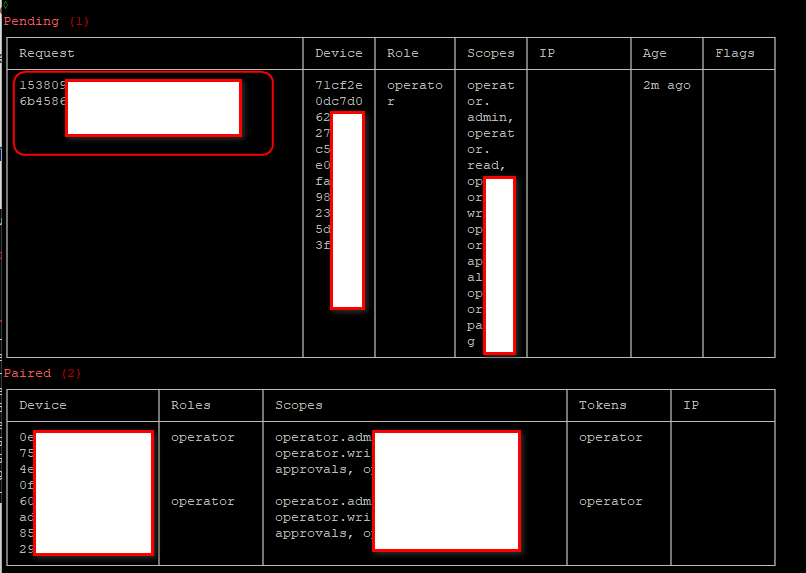
zfou813@localhost:~$ # 批准第一个
openclaw devices approve 899973e7-04a7-4fc9-850a
# 批准第二个
openclaw devices approve 346c7aeb-28e1-4e7f-ba50 -
把 Pending 里的 Request ID 复制,执行批准命令:
openclaw devices approve 复制的ID
- 刷新浏览器 → 即可进入完整面板
常用维护命令(记住这几条就够)
# 重启面板
openclaw gateway
# 查看状态
openclaw gateway status
# 查看待配对设备
openclaw devices list
# 批准设备
openclaw devices approve 设备ID
# 查看当前 token(重要)
openclaw config get gateway.auth.token

